Popular Posts
-
Elegant Themes has been developing WordPress themes for a long time. It has developed lots of popular themes including Divi, Nexus, Fa...
-
League Table Premium WordPress Plugin makes it able to add in a successful manner customizable, and responsive tables to your Word...
-
Engagement, engagement, engagement. My brother Lee and I are web developers and entrepreneurs. We try to capitalize on every opportunity a...
-
Hello there! My blog post 'Spikes' was published on Sept. 22nd; however, the post before it called 'Flow' was published on...
-
Quick question: Do you know what IFC, The New York Post, The Walt Disney Company, and WNBA have in common? Ponder the answer for a momen...
-
WordPress has evolved to be much more than just a blogging platform, from online stores to full-on business platforms, there is ve...
-
In this article, I'm going to cover a topic that doesn't get a lot of love – WordPress multisite. I recently attended a session ...
-
While my birthday isn't until the 20th, fellow WordPress blogger and all-around swell guy @TheDeviot from CommaEightCommaOne sent me a...
-
Amelia is a Premium WordPress Theme is Perfect for any Blog or Magazine.Theme has a unique design with a lot of options, that can help...
-
Choosing a WordPress theme is one of the most important steps when building your website. Should you go with a free theme or paid? WordP...


The Beginners Guide to WordPress SEO
WordPress is used by millions of people right around the world to setup websites for a variety of applications. While it's popular because it's easy to get up and running and use, it still requires proper optimization in order to really improve your overall search engine rankings.
This guide will give WordPress beginners a basic overview of WordPress SEO to help your website get found online.
This article will cover:
So let's get started!
Your Guide to WordPress Search Engine Optimization Title TagsTitle tags are used in the head section of a web page to communicate your page title better to both search engines and visitors. WordPress generally features a number of different pages which include just to name a few:
Title tags help to boost SEO efforts which in-turn can help to boost your overall rankings. The title tag will tell your visitors what the post is about before they click into it. The title tag is generally seen in search engine results as shown below:

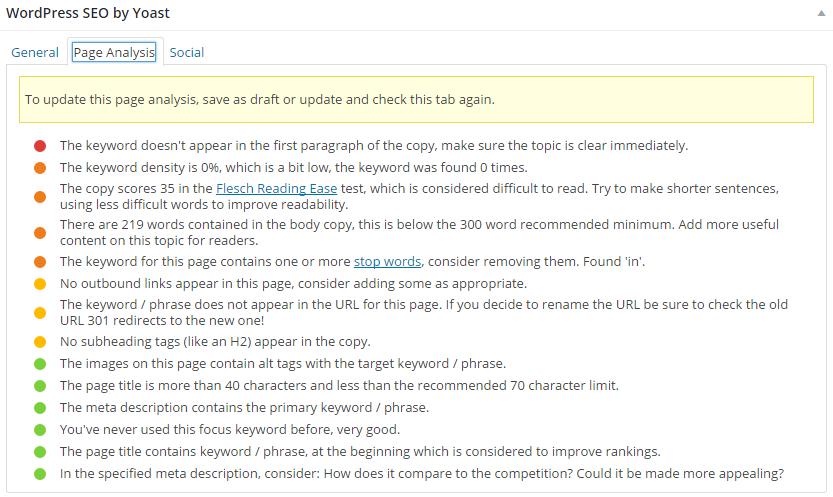
In WordPress, if you've installed the Yoast SEO plugin (which we'll cover later), you'll see an area for the meta description and keyword to be implemented. For optimal SEO, the meta description should include the relevant keyword that's going to be used for the overall post. The title of your post should also feature the relevant keyword for optimal impact. It's important to make your content clear for users, not just search engines.
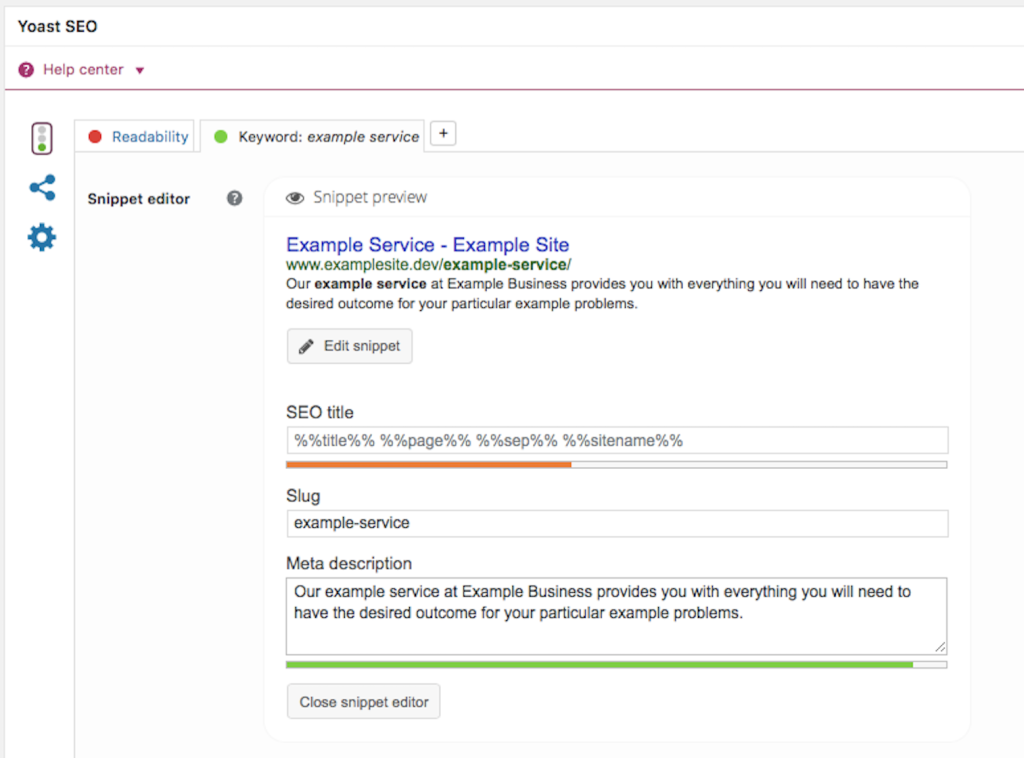
Note the area for implementing the meta description and the focus keyword, this helps Yoast provide you with SEO suggestions and advice for anything you may have missed.
So what's the point of meta descriptions? Meta descriptions are what you see in search engine results. They tell you what the website or page content is about before you enter the website as seen in the images below:
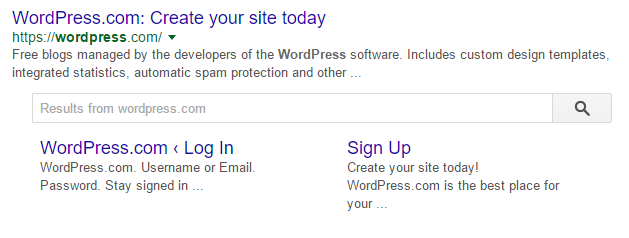
Including meta descriptions allows your WordPress post to be seen by search users. If you don't specify a meta description, the search engines will typically take the first sentence, which might not be ideal and entice users to visit your site. Meta descriptions themselves don't influence search rankings, however they're important for providing a call to action in the search results pages.
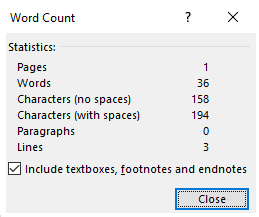
Generally, WordPress will count down the character limit for you when writing your meta description, however if you're using a Word document you can find out the character limit of your meta description by highlighting them and clicking on the word count at the bottom left hand side of the screen.
Permalinks are the URLs of your posts. Permalinks tell your visitors what your link is about before they actually click into it. The words that are used in permalinks will also be highlighted (as with titles and meta descriptions) in search engine results as well when searches are relevant to a search query. In order to change your permalinks all you need to do is:


Permalinks are a great way to provide a clear, relevant structure of your content.
Focus Keyword PhrasesKeyword phrases are specialized phrases which are used to optimize your pages to send more traffic to them. Key phrases are used as the core key phrase that your page will be searched for and ranked for. Think about what you want your site to be found for.
Focusing on keywords and phrases in these areas and implementing it in the Yoast SEO Focus Keyword section can help to boost your WordPress website's overall visibility to both users and search engines. Keyword research will be covered in more detail below.
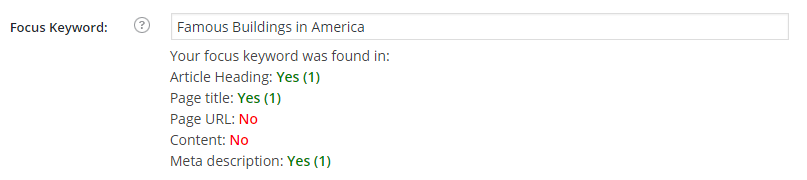
Image file names and Alt Text are a good way to add meaning to your images to help naturally describe and define your images using relevant keywords for screen readers and search engines. File names and Alt Text can be added when you upload your images, here are the steps:
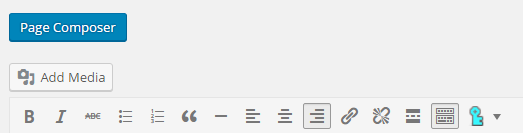
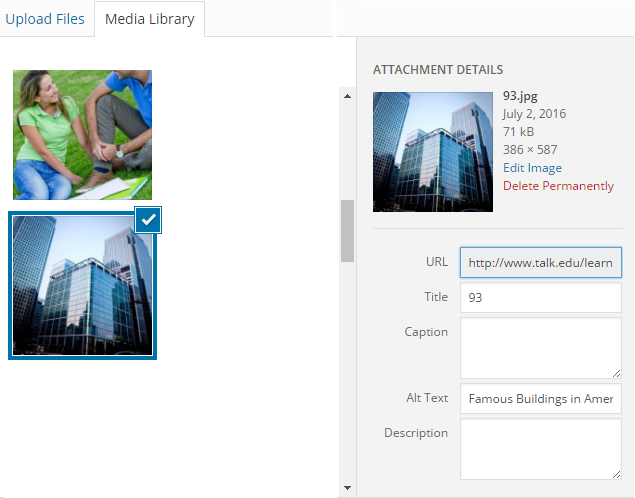
Your image will now be integrated into your content with the additional keyword information.
Internal LinkingInternal linking (or interlinking) is the process of linking one page to another page on your WordPress site. Internal linking holds many benefits, which include:
To link one page (or post, the process is the same) to the next, all you need to do is add a hyperlink or anchor text to a word that relates with the page you're linking it to. To insert a hyperlink, you can follow these steps:
1. Go to the page you're looking to link to and copy the URL of the blog post.

2. Highlight a word or piece of text that you want the page to link to.
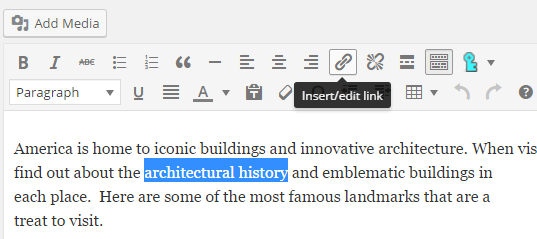
3. Click the link button along the top bar of WordPress editor and paste the relevant link into the link field and click 'Add Link'.
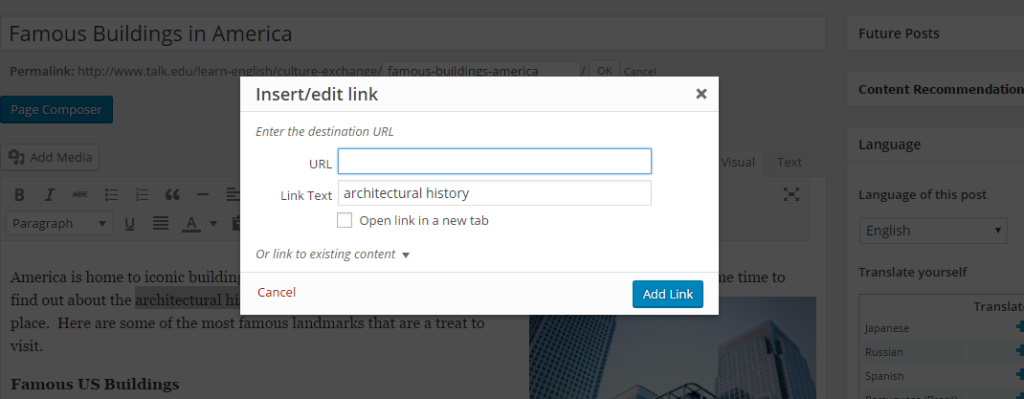
It's really is quite easy to interlink pages and posts in your WordPress content, and best of all it can help your users and benefit your SEO.
There are many ways to achieve the same things in WordPress, explore the content editor and find what best works for you.
Yoast SEOYoast SEO is one of the most popular WordPress SEO plugins, it is free and is used daily by millions of WordPress users around the world. Yoast SEO offers users with on-page analysis, proper social optimization and many other features to help with SEO. The reasons why Yoast SEO is so popular is because:
Keyword research is typically done at the start of your project. Keywords are the key words which are used by people to search for items on search engines. When researching the keywords to use for your WordPress site, it's important to consider the following tips:
Examples of the three different types of keywords include:
Use keywords that best match what your page is about. There's no point trying to use the words 'men's clothing' if you're selling young boy's clothing. Always use appropriate keywords for the appropriate pages.
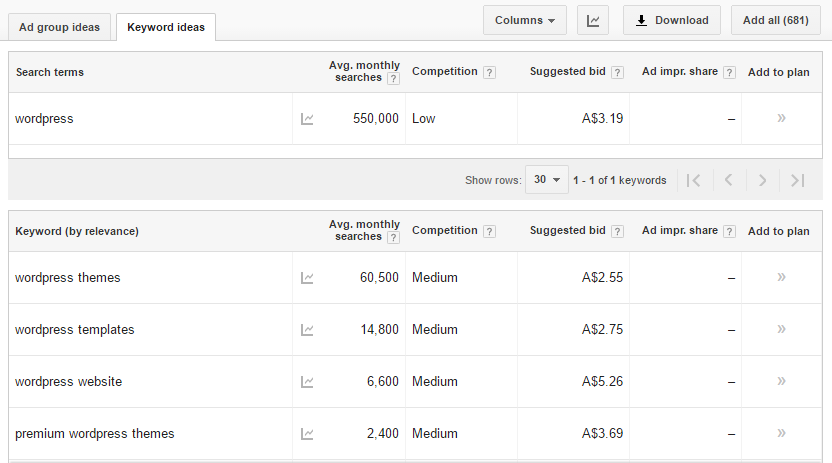
Besides Google Keyword Planner, you can also use the Search Analytics report in Google Search Console to better gauge the keywords people have used to either find your website in the search results or click through to your site. Search Analytics gives you a wealth of keyword data that can be utilized to further enhance your page.
WordPress SEO TweaksTo help improve SEO on your WordPress site you can make a few tweaks to older content that you have previously published across the years. Some areas to tweak include:
ImagesImproving the overall image quality of your blog posts and including Alt Text as suggested above can improve the SEO of your website. When uploading images, they need to be free to use. Sites where you can obtain quality images include Pixabay, ShutterStock, Fotolia, and Stock Photo Secrets to name a few. Some are free to use, while others you may have to pay a price for the images. Here's a great article on finding copyright free images on Flickr that is worth bookmarking.
Title ChangesChanging the titles of your older pages and posts to incorporate keywords can help to improve your overall SEO. Titles should also be changed to become more intriguing and relevant to readers. The more intriguing a title is the more visitors will come to your website. Titles are also important when content is shared on social media, since it's often the only thing people see. Take extra time learning what works for your site.
Page SpeedIf a page doesn't load within 2-3 seconds, many people will abandon your site. To make sure your page loading speed it at peak efficiency you can:
Website performance and optimization is a massive area, we've got a previous articles on SitePoint that dig much deeper:
ConclusionWordPress is a great option to use when setting up a website. By understanding the basics of WordPress you have a higher chance of creating a website that is optimized for users that can also rank well in search engines. If you want to share your WordPress SEO tips, we'd love to hear from you below.
The SitePoint Marketing channel also has a wealth of information on SEO and other marketing strategies. You can check it out here.
Source: The Beginners Guide to WordPress SEO
0 comments:
Post a Comment