Popular Posts
-
Elegant Themes has been developing WordPress themes for a long time. It has developed lots of popular themes including Divi, Nexus, Fa...
-
Engagement, engagement, engagement. My brother Lee and I are web developers and entrepreneurs. We try to capitalize on every opportunity a...
-
League Table Premium WordPress Plugin makes it able to add in a successful manner customizable, and responsive tables to your Word...
-
Hello there! My blog post 'Spikes' was published on Sept. 22nd; however, the post before it called 'Flow' was published on...
-
Quick question: Do you know what IFC, The New York Post, The Walt Disney Company, and WNBA have in common? Ponder the answer for a momen...
-
WordPress has evolved to be much more than just a blogging platform, from online stores to full-on business platforms, there is ve...
-
Hi, I am new to wordpress, and still figuring things out. I have been experimenting with different themes, and have been changing settings...
-
Amelia is a Premium WordPress Theme is Perfect for any Blog or Magazine.Theme has a unique design with a lot of options, that can help...
-
The best Black Friday / Cyber Monday WordPress Deals in 2016 all in one place. If you missed the huge deals last year, be sure to get in...
-
So you want to sell a product online. We think that's awesome! Now all that's left is to decide how. Lucky for you WordPress makes...


The Best Facebook Reaction Plugins for WordPress

Thanks to Facebook's popularity, any seemingly simple idea often becomes wildly trendy and users embrace it with open arms. One of Facebook's latest offerings is the ability for people to better express themselves thanks to its 'Like Reactions' feature.
This addition lets you post an emoticon whenever you 'Like' someone's post, ranging from happy to sad to funny. Considering it's been well-received by users, wouldn't it nice if your WordPress blog had a similar feature as well?
Let's look into various Facebook reaction plugins for WordPress to add more style to your content.

This plugin comes with six reactions (as of this writing) including: Laugh, love, like, sad, surprised, and angry. This plugin, while not as robust as some of the ones below, does a pretty decent job with the exception of certain themes not yet supporting it very well.
Otherwise DW Reactions is simple and easy to use, ideal if you're looking to quickly set something up without many bells and whistles. It also possesses a similar design to that of Facebook reactions, making the learning curve even easier for you and end-users alike.
Its main features include the ability to toggle a "Reactions count" on posts, limiting the plugin only to registered users, shortcode usage, and mobile device implementation.
The plugin's premium version brings more cool, albeit optional features. You can track statistics among users who have reacted, access a few more emoticons, as well as a widget that displays the most "Reacted to" posts on your blog.

MyEffecto implements a rating system based on emotional icons, allowing users to visually express how they feel about your content. These appear within a small menu and, similarly to Facebook, you may tell authors whether you like or dislike a post, and much more.
Simply visit the plugin options from the WordPress Settings tab, although it comes practically ready to use out of the box.
This is where it gets fun, though: The plugin comes with many emoticons and you can customize the text that accompanies each one. You may also choose to show these on pages, posts, and on the homepage. Lastly, it works pretty well on mobile devices to ensure everyone can react to your content properly.

Among Facebook reaction plugins, this one is hit-and-miss when compared to the rest. However, it nicely implements the basic premise with a few extra settings in between.
With that said, this plugin is currently not among our favorites, considering the extra steps and general nuisance it currently presents.
For example, changing its settings requires you to create a free account on the plugin author's website. Once registered, you must go back to your WordPress site and log in before being able to play with its options.
Thankfully not everything is bad news, and these are the main reasons I have included it in this post:
Select from over a dozen reaction-based themes.Change the text that appears within the main reactions menu.It provides an easy-to-spot counter to inform people how many have reacted a certain way.Simple analysis detailing how many reactions you've received within a certain period.Evaluate which type of content generates the most reactions.
Honorable mentions:
Emoji Reactions: Choose from over a dozen reactions and display them on posts, pages, and comments.
React & Share: Pretty neat contender among Facebook reaction plugins. Not only can users react – they can also share how they feel via social media.
Simple Emoji Reactions: Add Facebook reactions to your posts – limited features, but it gets the job done.
Final ThoughtsIn my opinion, Facebook reaction plugins will only increase in popularity, so feel free to jump on the bandwagon. Can you recommend other ways to add Facebook reactions to your blog?
Don't Miss: How to Make Your Content More FunSource: The Best Facebook Reaction Plugins for WordPress
RHONY Bravo Blogs: Luann & Ramona

I am unsure what happened to the beginning of the blog. WordPress seams to have eaten most of the first paragraph. I am feeling quite unwell, and this is the best I can do to fix it at the moment. Sorry for the mess.
There was some discussion about the tone of Carole's blogs all season. She was literally offended by everything. She came for Jules as well. And also Dorinda, Carole Comes for Dorinda. As I went to pull that link, I noticed a trend. At first her target was Luann. She said reasoning with Luann is like trying to reason with a toddler. I have probably purple penned Carole more than anyone else on RHONY this season because she has been bitter and anger and mean on every episode and each blog has been meaner than the last.
Then last night we got this nice, happy, civilized well mannered Carole. Was it because Bethenny excused herself because she is too rich to enjoy gambling and was barely in any of the scenes this week? I think the only reason they didn't leave the entire casino trip on the cutting room floor is because they needed a scene with Bethenny to put on the show. When Bethenny is not in the scene, Carole reverts back to the easy going Carole we all liked in season one. So I was dying to see how she would explain her radical personality change in this episode. So far nothing is up. I'll keep checking.
The only two blogs that are up this week so far are Jules, who just recounts the events of the episode. She mentioned the potty trainer and understands the crap she is getting for it, but it worked and was money well spent from her point of view. She also hinted that she enjoys laughter and humor.

Sonja is fixated on Tom and while she says she's not jealous, she keeps bringing up her past with him even though we are engaged. She says she's happy for me, but her body language and facial expressions tell a different story. I know that it's hard to watch someone move forward while being stuck in the past but Sonja has to realize that my relationship with Tom is very special and that he may not have been the marrying type before meeting me, but he is now! When you meet the right person, this is what happens.
Luann has Sonja (and Ramona) all figured out. She ends her blog with "kill them with kindness" and that has been her tactic all season. It's a good look for Luann and it's one of her best seasons ever.
I didn't read Ramona's blog last week, she is usually the last one to turn hers in. But I really want to address it now. Just remember this is from last week's episode. She calls it Stop, Listen and Learn. I prefer Vanilla Ice's version, "Stop, Collaborate and Listen!" I lyric I used many times with first graders. They loved it, and learned a new word. Moving on.

Ramona's ENTIRE BLOG was about Luann. No mention of anything or anyone else at all.
After thinking and watching last night's eposide, I can't believe that Luann is in such denial. How can someone be that head strong just to find a man to get married at this stage of life…the second or third time around? I would think that from past experiences women would learn.
At what stage of life does it become a bad idea to marry someone who you love? Luann's past relationships include a 16 year marriage and a long term relationship with Jacques that ended because he wanted to have children. In between there was a single life that she enjoyed to the fullest, dating lots of guys. I think her experience tells her that she prefers to be in a long term relationship, so she is getting married. Where is the denial you are accusing her of?
I am not preaching, because obviously I have had my own share of experiences, and all experiences are different. But that being said, if my friend knew what my fiancé was doing at the time I was engaged and I was told that he had close relations with friends of mine just weeks prior to my engagement, I would say OMG, this is a red flag!
You are preaching. You want Luann to have the same reaction to the situation you think you would have.

These are facts, not lies and not exaggerations, and yes, I thought that I should be able to tell Luann. But she doesn't have the capibility to listen! She shut it down and turned it around.
The only facts you have is that you went to dinner with Tom once or twice. Why would that bother Luann? Sonja is a known liar and exaggerator. Her first language is Hyperbole. She's untrustworthy. And she wants to make everything about her. I don't know anything about Tom's character, but I would believe him over Sonja every day of the week. She listened to you every time you brought the information to her in the snarkiest, most evil of fashions. You didn't say, " Luann, I am so happy you have found love, I do have some information that I feel I should share with you…" You cackled and said, "Oh that guy, he has a girlfriend he bought her jewelry from Christmas, I used to date him and Sonja sleeps with him on the regular. Really? You are in love with THAT Tom?" Even your daughter was embarrassed for you. She shut it down, because you won't shut the fuck up about it! You need to listen to HER when she says she heard you the first ten times and is unbother ed by the information. Then you need to shut up.
The fact that she completely took the conversation to mean that I was jealous? I mean, like really? Jealous? Not a word in my vocabulary! Really? What would I be jealous of? I have never had a problem meeting men. Since my early 20s I've been the date queen! Yes, that is what friends have called me.
Probably because you are acting like a jealous ex girlfriend of Tom's and doing all you can to try to break them up. That's just my guess.
But Luann always seems so desperate for the attention, for the support, for the reassurance that a man is interested in her. So maybe that is why she chooses not to listen and learn about what Tom has been up to? She cut me off and cut me down to the point that truly I am not interested again in telling her like it is. I guess she will find out herself…
I wish it were true that you are not interested in "telling her like it is." I'm sure Luann would really appreciate you stopping trying to make everything about you as you beg for attention and camera time.
Clearly, Ramona doesn't have a ghostwriter.
I'll keep checking for Carole…
Source: RHONY Bravo Blogs: Luann & Ramona
Best of July 2016: 10 Free WordPress Themes
Each month, we look for the most beautiful, fresh, and above all else, free WordPress themes for your blog revamp. This month is very generous when it comes to newly published templates for our favorite CMS. We have found a couple of very appealing themes that can freshen up and embellish your website from now on. Have fun while discovering the new themes.


Edge is to be considered a blogging theme and lets you customize the background, the header, and the logo. On top of that, it comes with plenty of options in the WordPress Theme Customizer. This way, everyone should be able to adjust bits and pieces to form their favorite design. Edge is also an interesting theme for photographers.

Smartr is a theme for a broad scope of use cases. However, it was mainly created as a theme for business or freelance websites. The theme offers many customization options. Colors, logo, background, and navigation are adjustable, and all Google Fonts can be used.

Elicit is a suitable theme for personal blogs, portfolio, travel, and photography websites. The background, the colors, as well as the headers, are customizable. Five widget areas and a custom widget for social networks round off the features of this theme.

Glowline is praised as being a blog theme, but should also leave a good impression as a portfolio or photography website. You're able to adjust the colors and the logo, and a slider for the landing page is included as well. The design may be considered bold.

Atlantic is a minimalistic theme for the optimal presentation of images. The theme is a good choice for photographers that want to show off their photos in large formats.

Blogpost Lite is a theme for magazines, portfolios, and personal blogs with an interesting way of presenting content. Supposedly, many things can be adjusted using the theme customization. However, there is not detailed information on that.
7 – Enamag
Enamag is a theme appropriate for magazines and news websites. It should also suit a personal blog. You get to influence the general layout, as well as the colors. You are also able to add a full-screen background image, and edit the logo and favicon.

Tuto is a magazine theme by MH Themes. Moreover, it's a perfect fit for all websites that focus on content. Adjust header, colors, as well as the background. You get to choose between two general layouts for the articles and determine a lot of other settings.

ViralBlog aims to be a professional blog theme that is meant to be a perfect choice for webmasters with lots of content. Homepage design options are included, and supposedly, the theme is optimized for speed and SEO.
10 – The Minimal
When using The Minimal, expect a theme for professional blogs, magazines, and photography websites. Four custom widgets, the option to adjust the logo, and two-page layouts round off the picture.
(dpe)
Source: Best of July 2016: 10 Free WordPress Themes
RHONY Bravo Blogs: Luann & Ramona
I am unsure what happened to the beginning of the blog. WordPress seams to have eaten most of the first paragraph. I am feeling quite unwell, and this is the best I can do to fix it at the moment. Sorry for the mess.
There was some discussion about the tone of Carole's blogs all season. She was literally offended by everything. She came for Jules as well. And also Dorinda, Carole Comes for Dorinda. As I went to pull that link, I noticed a trend. At first her target was Luann. She said reasoning with Luann is like trying to reason with a toddler. I have probably purple penned Carole more than anyone else on RHONY this season because she has been bitter and anger and mean on every episode and each blog has been meaner than the last.
Then last night we got this nice, happy, civilized well mannered Carole. Was it because Bethenny excused herself because she is too rich to enjoy gambling and was barely in any of the scenes this week? I think the only reason they didn't leave the entire casino trip on the cutting room floor is because they needed a scene with Bethenny to put on the show. When Bethenny is not in the scene, Carole reverts back to the easy going Carole we all liked in season one. So I was dying to see how she would explain her radical personality change in this episode. So far nothing is up. I'll keep checking.
The only two blogs that are up this week so far are Jules, who just recounts the events of the episode. She mentioned the potty trainer and understands the crap she is getting for it, but it worked and was money well spent from her point of view. She also hinted that she enjoys laughter and humor.
Sonja is fixated on Tom and while she says she's not jealous, she keeps bringing up her past with him even though we are engaged. She says she's happy for me, but her body language and facial expressions tell a different story. I know that it's hard to watch someone move forward while being stuck in the past but Sonja has to realize that my relationship with Tom is very special and that he may not have been the marrying type before meeting me, but he is now! When you meet the right person, this is what happens.
Luann has Sonja (and Ramona) all figured out. She ends her blog with "kill them with kindness" and that has been her tactic all season. It's a good look for Luann and it's one of her best seasons ever.
I didn't read Ramona's blog last week, she is usually the last one to turn hers in. But I really want to address it now. Just remember this is from last week's episode. She calls it Stop, Listen and Learn. I prefer Vanilla Ice's version, "Stop, Collaborate and Listen!" I lyric I used many times with first graders. They loved it, and learned a new word. Moving on.
Ramona's ENTIRE BLOG was about Luann. No mention of anything or anyone else at all.
After thinking and watching last night's eposide, I can't believe that Luann is in such denial. How can someone be that head strong just to find a man to get married at this stage of life…the second or third time around? I would think that from past experiences women would learn.
At what stage of life does it become a bad idea to marry someone who you love? Luann's past relationships include a 16 year marriage and a long term relationship with Jacques that ended because he wanted to have children. In between there was a single life that she enjoyed to the fullest, dating lots of guys. I think her experience tells her that she prefers to be in a long term relationship, so she is getting married. Where is the denial you are accusing her of?
I am not preaching, because obviously I have had my own share of experiences, and all experiences are different. But that being said, if my friend knew what my fiancé was doing at the time I was engaged and I was told that he had close relations with friends of mine just weeks prior to my engagement, I would say OMG, this is a red flag!
You are preaching. You want Luann to have the same reaction to the situation you think you would have.
These are facts, not lies and not exaggerations, and yes, I thought that I should be able to tell Luann. But she doesn't have the capibility to listen! She shut it down and turned it around.
The only facts you have is that you went to dinner with Tom once or twice. Why would that bother Luann? Sonja is a known liar and exaggerator. Her first language is Hyperbole. She's untrustworthy. And she wants to make everything about her. I don't know anything about Tom's character, but I would believe him over Sonja every day of the week. She listened to you every time you brought the information to her in the snarkiest, most evil of fashions. You didn't say, " Luann, I am so happy you have found love, I do have some information that I feel I should share with you…" You cackled and said, "Oh that guy, he has a girlfriend he bought her jewelry from Christmas, I used to date him and Sonja sleeps with him on the regular. Really? You are in love with THAT Tom?" Even your daughter was embarrassed for you. She shut it down, because you won't shut the fuck up about it! You need to listen to HER when she says she heard you the first ten times and is unbother ed by the information. Then you need to shut up.
The fact that she completely took the conversation to mean that I was jealous? I mean, like really? Jealous? Not a word in my vocabulary! Really? What would I be jealous of? I have never had a problem meeting men. Since my early 20s I've been the date queen! Yes, that is what friends have called me.
Probably because you are acting like a jealous ex girlfriend of Tom's and doing all you can to try to break them up. That's just my guess.
But Luann always seems so desperate for the attention, for the support, for the reassurance that a man is interested in her. So maybe that is why she chooses not to listen and learn about what Tom has been up to? She cut me off and cut me down to the point that truly I am not interested again in telling her like it is. I guess she will find out herself…
I wish it were true that you are not interested in "telling her like it is." I'm sure Luann would really appreciate you stopping trying to make everything about you as you beg for attention and camera time.
Clearly, Ramona doesn't have a ghostwriter.
I'll keep checking for Carole…
Source: RHONY Bravo Blogs: Luann & Ramona
Enhance Your WordPress Comments with a Mention Feature
Many WordPress sites allow visitors to share comments on blog posts. There are several WordPress plugins that also enable visitors to leave a reply to comments. However, this process can get confusing when more than one author is replied to or referenced in the comment.
In this tutorial, I'll be covering how to write a handy WordPress plugin that brings a Twitter-like mention feature right into our WordPress site, to allow readers to tag each other in comments.
At the end of this tutorial, I'll provide a link to download the plugin which also has some additional features and a link to view the plugin on GitHub.
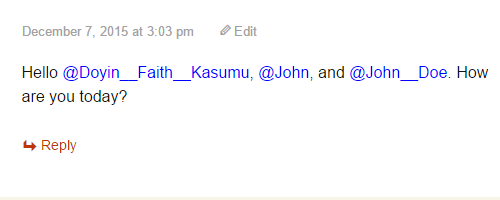
All WordPress plugins are PHP files located at /wp-content/plugins/ directory. In here, we create a PHP file wp-mention-plugin.php.
Next, we include the plugin header, otherwise WordPress won't recognize our plugin.
<?php /** * Plugin Name: WP Mention Plugin * Plugin URI: https://sitepoint.com * Description: Mention both registered and non registered @comment__author in comments * Version: 1.0.0 * Author: Doyin Faith Kasumu * Author URI: http://t2techblog.com * License: GPL2 */Now we create the plugin class as follows:
class wp_mention_plugin { //codesAll our action and filter hooks will go into the initialize() method, since we're making this our constructor, the first method called when the class is instantiated.
public static function initialize() { add_filter( 'comment_text', array ( 'wp_mention_plugin', 'wpmp_mod_comment' ) ); add_action( 'wp_set_comment_status', array ( 'wp_mention_plugin', 'wpmp_approved' ), 10, 2 ); add_action( 'wp_insert_comment', array ( 'wp_mention_plugin', 'wpmp_no_approve' ), 10, 2 ); } Code ExplanationThe comment_text filter hook filters the text of comments to be displayed. The wp_set_comment_status action hook is triggered immediately when the status of a comment changes, and the wp_insert_comment action hook is triggered immediately when a comment is submitted.
We will be styling any name with a preceeding '@' symbol without quotes, and this is why we need the comment_text filter hook.
In WordPress sites where comments are held for moderation before being approved, we need the wp_set_comment_status action hook to track newly approved comments for the mentioned authors.
The wp_insert_comment is needed to track comments for the mentioned author, in cases where comments were never held for moderation but automatically approved.
Now let's create the functions called in our initialize() method. First off, the wpmp_mod_comment()
public static function wpmp_mod_comment( $comment ) { // we set our preferred @mention text color here $color_code = '#00BFFF'; $pattern = "/(^|\s)@(\w+)/"; $replacement = "<span style='color: $color_code;'>$0</span>"; $mod_comment = preg_replace( $pattern, $replacement, $comment ); return $mod_comment; }Here, we create a method wpmp_mod_comment() meaning: WP Mention Plugin Modify Comment. The function accepts a single parameter, which is the comment we're modifying. Don't worry about this parameter, WordPress handles it.
The $pattern variable creates a simple regular expression pattern, which determines whether @any__comment__author__name is being mentioned in any comments. When things like admin@sitepoint are being included in a comment, they don't get recorded as a valid mention. Valid mentions will be styled in a deep sky blue color.
If you would like to change the color of @mention text, just change the value of the $color_code variable.
Before we proceed further, let's create the method that handles the notification email sent to the mentioned comment authors.
private static function wpmp_send_mail( $comment ) { $the_related_post = $comment->comment_post_ID; $the_related_comment = $comment->comment_ID; $the_related_post_url = get_permalink( $the_related_post ); $the_related_comment_url = get_comment_link( $the_related_comment ); // we get the mentions here $the_comment = $comment->comment_content; $pattern = "/(^|\s)@(\w+)/"; // if we find a match of the mention pattern if ( preg_match_all( $pattern, $the_comment, $match ) ) { // remove all @s from comment author names to effectively // generate appropriate email addresses of authors mentioned foreach ( $match as $m ) { $email_owner_name = preg_replace( '/@/', '', $m ); $email_owner_name = array_map( 'trim', $email_owner_name ); } /** * This part is for For full names, make comment authors replace spaces them with * two underscores. e.g, John Doe would be mentioned as @John__Doe * * PS: Mentions are case insensitive */ if ( preg_match_all( '/\w+__\w+/', implode( '', $email_owner_name ) ) ) { $email_owner_name = str_ireplace( '__', ' ', $email_owner_name ); } // we generate all the mentioned comment author(s) email addresses $author_emails = array_map( 'self::wpmp_gen_email', $email_owner_name ); // ensure at least one valid comment author is mentioned before sending email if ( ! is_null( $author_emails ) ) { $subj = '[' . get_bloginfo( 'name' ) . '] Someone mentioned you in a comment'; $email_body = "Hello, someone mentioned you in a comment($the_related_comment_url)". " at MyBlog.com. Here is a link to the related post: $the_related_post_url"; wp_mail( $author_emails, $subj, $email_body ); } } } Code ExplanationIn the above method, we filter the comment to check if anyone is being mentioned. And if true, we remove the preceeding '@' symbol before the comment author name, so that we can generate the comment author info from the database using the name.
At times, comment authors do fill in full names, for example 'John Doe', or names with spaces as their comment author name. In cases like this, anyone mentioning them must replace spaces in the name with double underscores. So starting from the line if ( preg_match_all( '/\w+__\w+/', implode( '', $email_owner_name ) ) ) .... we ensure that all double underscores in @mention text gets converted into spaces.
We then generate the mentioned comment author email address using the wpmp_gen_email() method we'll be creating next. The $email_body variable and the wp_mail() function stores and sends the notification email respectively, with a link to the corresponding comment and post.
NOTE If you noticed in the codes, mentioned comment authors and their email addresses are stored in an array, this is just in case more than one comment author is mentioned.
Remember to change the line MyBlog.com in $email_body to your desired site name.
public static function wpmp_gen_email( $name ) { global $wpdb; $name = sanitize_text_field( $name ); $query = "SELECT comment_author_email FROM {$wpdb->comments} WHERE comment_author = %s "; $prepare_email_address = $wpdb->prepare( $query, $name ); $email_address = $wpdb->get_var( $prepare_email_address ); return $email_address; } Code ExplanationI've talked much on this method earlier, it simply generates the mentioned comment author email. The $name string parameter it accepts is the comment author name. Then it gets the mentioned comment author info from the database using the comment author name. To prevent an SQL attack, we use the WordPress prepare() function to ensure queries are safely handled.
Now we create two more methods which track whether a comment is first held for moderation or not, before sending the notification email.
public static function wpmp_approved( $comment_id, $status ) { $comment = get_comment( $comment_id, OBJECT ); ( $comment && $status == 'approve' ? self::wpmp_send_mail( $comment ) : null ); } public static function wpmp_no_approve( $comment_id, $comment_object ) { ( wp_get_comment_status( $comment_id ) == 'approved' ? self::wpmp_send_mail( $comment_object ) : null ); }The wpmp_approved() firstly checks if a comment with $comment_id held for moderation is approved, before calling the wpmp_send_mail() method which sends the notification email.
While wpmp_no_approve() calls the wpmp_send_mail() method which sends the email notification immediately when a comment is being automatically approved, without first holding for moderation.
Before the plugin can do what we've just coded it to do, we have to instantiate the class wp_mention_plugin we've just worked on, and call the initialize() method which registers our needed action and filter hooks.
} $wp_mention_plugin = new wp_mention_plugin; $wp_mention_plugin->initialize(); ?>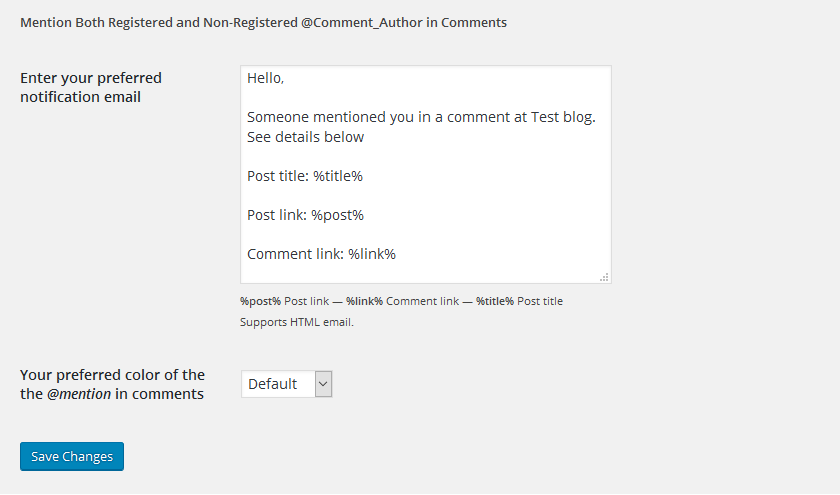
In this tutorial, I covered how to create a handy WordPress plugin that brings a Twitter-like mention feature right into our WordPress site.
You can download Atmention in Comment here, a plugin I created that handles the mention feature integration with a few more features. Otherwise you can check out the plugin: WP Mention Plugin code on GitHub.
Source: Enhance Your WordPress Comments with a Mention Feature